

Vector Databases 101: What They Are, Why They Matter, How to Start

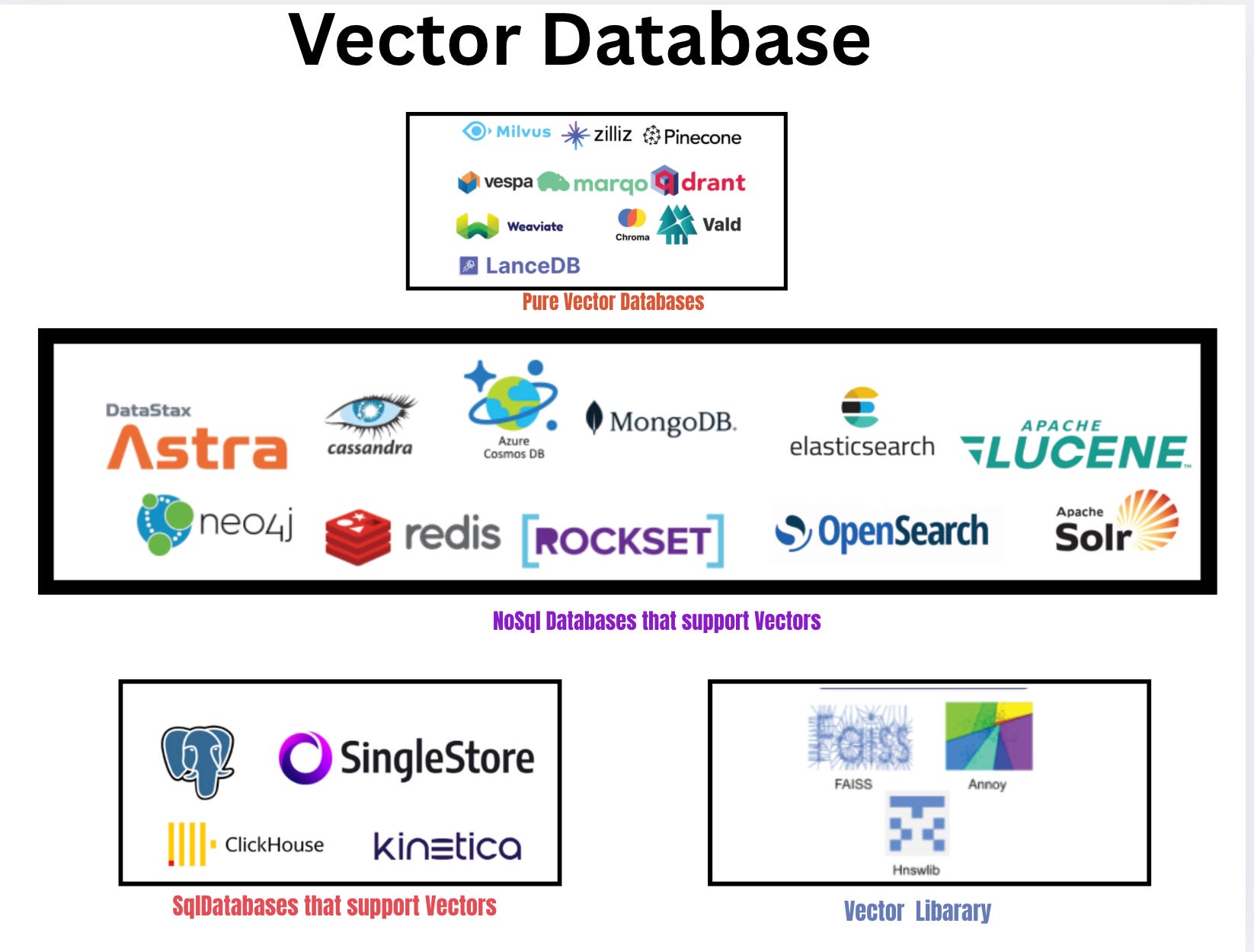
👋 Welcome to this edition
In every issue, we explore one concept that’s shaping the future of technology—breaking it down in plain English, with examples you can actually try.
This time, we’re looking at Vector Databases—the engines behind smarter search, better recommendations, and AI-powered apps.
Whether it’s Netflix suggesting the right show or Google Photos recognising faces, vector databases are doing the heavy lifting.
Let’s unpack what they are, why they matter, and how you can get started.
Introduction: Why Vector Databases Matter
Think about how Generative AI works.
You ask ChatGPT: “Explain quantum physics like I’m 12.”
Or you upload a picture and ask: “Write a caption for this.”
The magic isn’t just that the AI “knows everything.”
It’s that it can understand meaning and retrieve context before generating an answer.
Now, here’s the secret:
Behind every GenAI system — from ChatGPT to recommendation engines on YouTube, Flipkart, or Netflix — there’s usually a vector database working silently in the background.
Why? Because Large Language Models (LLMs) don’t search the internet live. Instead, they work with embeddings — numerical lists that capture the essence of text, audio, or images.
“budget phone with good camera” becomes a vector.
“affordable smartphone with quality photos” becomes another vector.
Even if the words are different, the vectors are close. That closeness is how AI understands meaning instead of just words.
And where do these embeddings live?
In vector databases — designed specifically to store, index, and search millions (or billions) of such vectors in milliseconds.
That’s why GenAI needs vector databases.
Without them, LLMs would generate hallucinations far more often, recommendations would be random, and search would feel like the early 2000s again.
Why learn Vector Databases now?
AI models (like GPT, BERT, CLIP) create embeddings — number lists that represent meaning. A vector database is designed to store these embeddings and quickly find the “closest” ones.
Learning vector databases matters because they power:
Chatbots with memory (retrieving past conversations).Recommendation engines (finding similar movies, songs, or products).Image and audio search (finding content by similarity).Research tools (semantic search across millions of documents).
In short: if you want to build AI apps that feel smart, vector databases are the missing piece.
Core Concepts
Here are 10 essential ideas
Vector
A vector is just a list of numbers that represent something.
Example: the word “Apple” → [0.21, -0.33, 0.95], Banana” → [0.22, -0.31, 0.90].
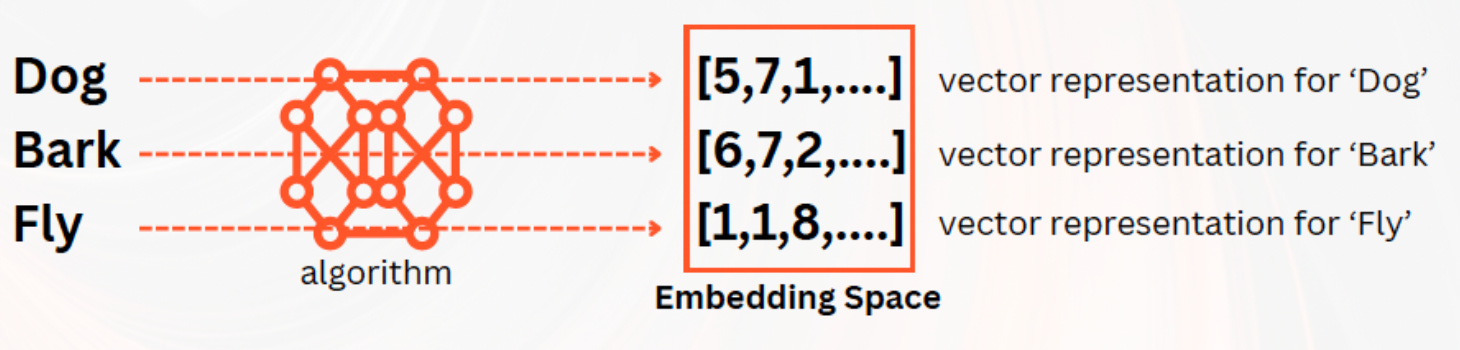
2 .Embedding
An embedding is how we turn text, images, or audio into vectors.
Example: “dog” and “puppy” get embeddings that are close together.
Cosine Similarity
It measures the angle between two vectors. If they point the same way, they’re similar.
Example: [1,0] vs [2,0] → similarity = 1 (very similar).Euclidean Distance
The straight-line distance between vectors. Closer = more similar.
Example: [0,0] vs [1,1] → distance ≈ 1.41.Index
An index is a shortcut that makes search faster.
Example: like an index in a book that tells you where to look, instead of flipping every page.ANN (Approximate Nearest Neighbor)
Instead of searching everything, ANN finds close-enough matches quickly.
Example: instead of checking every shop, you ask locals where to buy milk.HNSW (Hierarchical Navigable Small World)
A graph-based index that connects vectors like cities on a map. You “travel” through shortcuts to reach the nearest one.Metadata Filtering
Search vectors but also filter by tags.
Example: “phones like iPhone 13 but under ₹40,000.”Hybrid Search
Mix keyword search and vector search for best results.
Example: search “budget laptop” using both text match + meaning match..
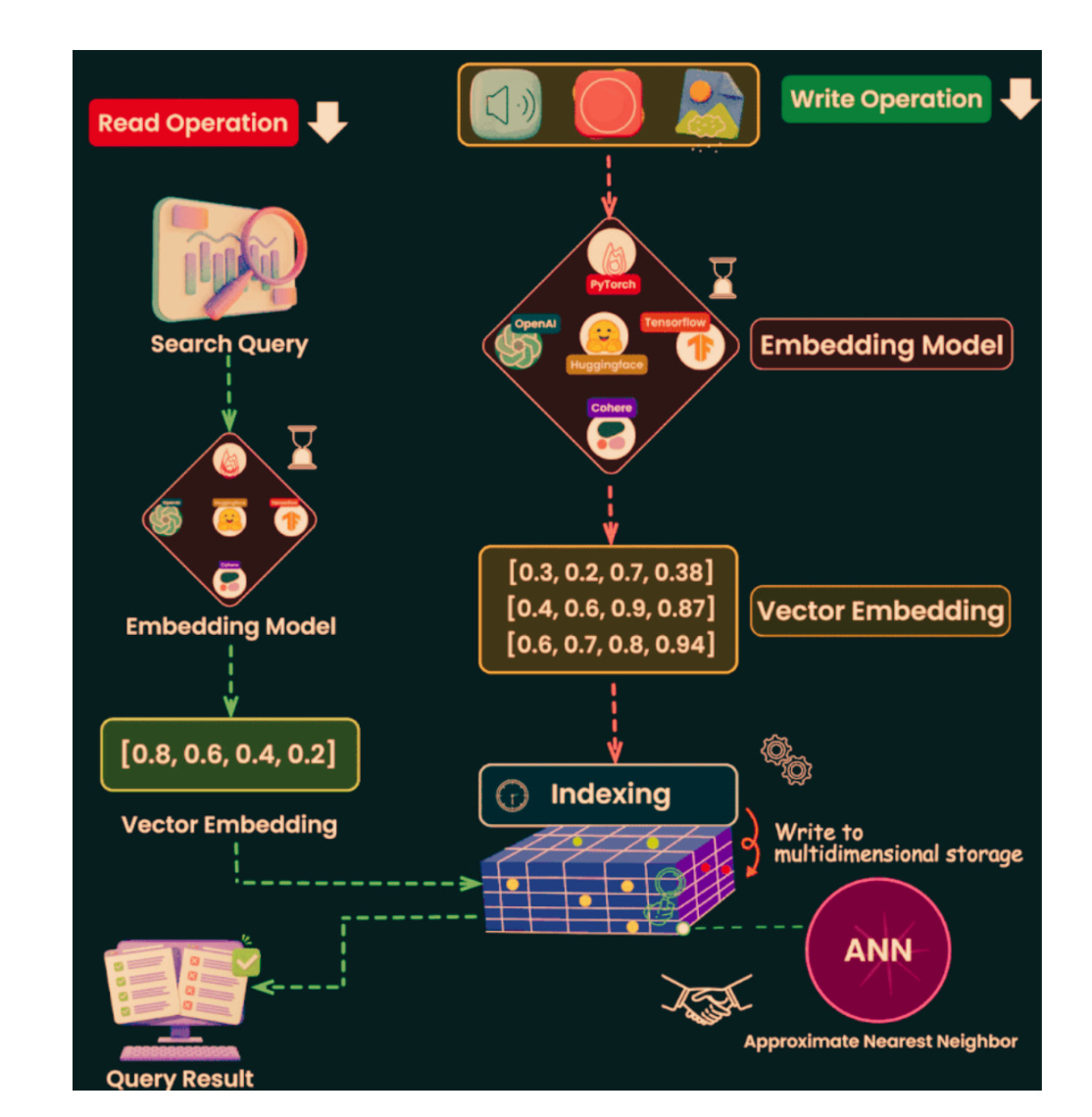
From Embeddings to Search: The Full Journey
How Vector Search Works (End to End)
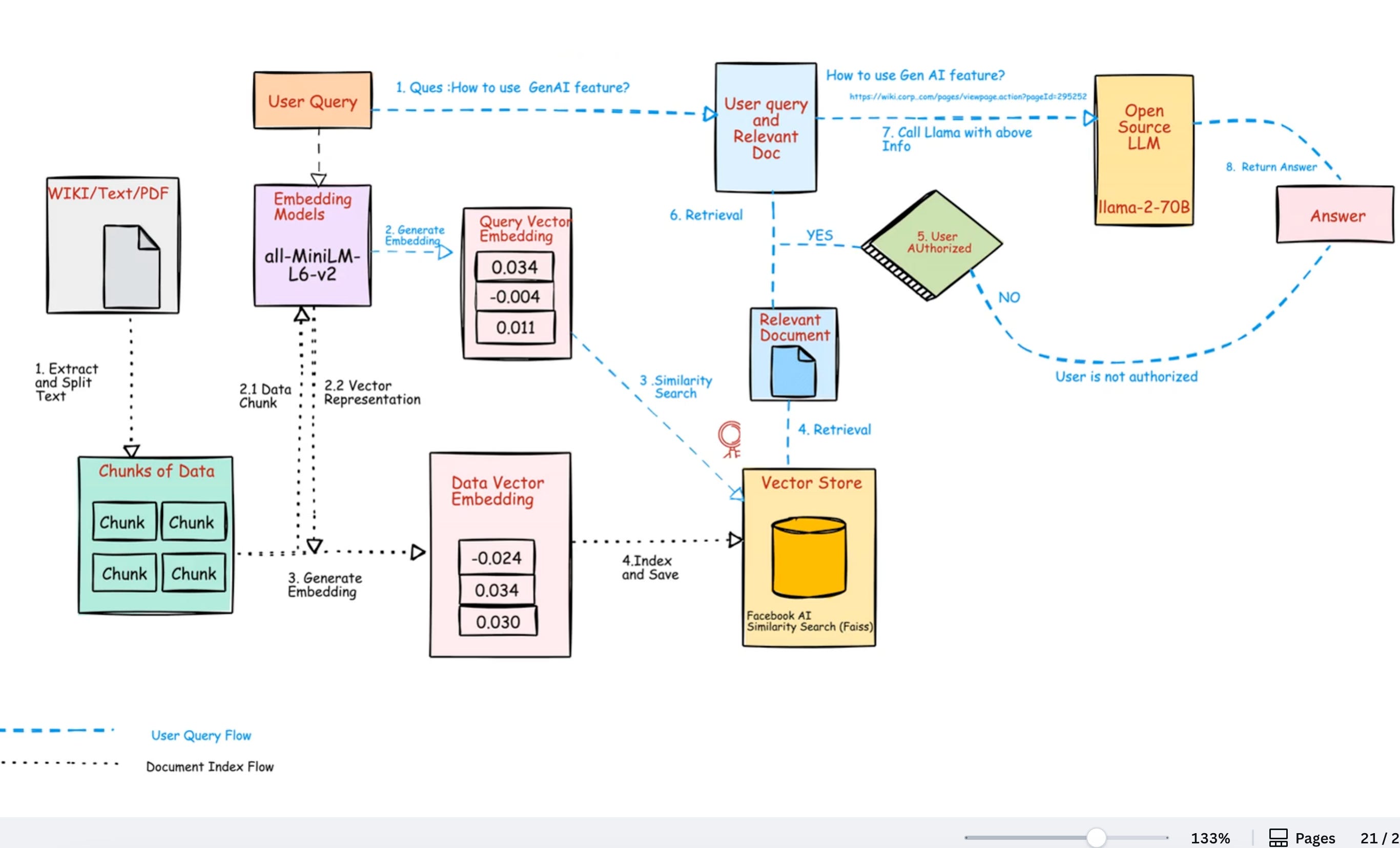
Above is the beginner-friendly pipeline.
Read it once, then skim it again with the diagram.
Collect data
Text, images, audio, or mixed. For your first project, start with text (notes, product titles, FAQs).Clean and chunk
Break long text into small chunks (300–500 tokens).
Reason: small chunks keep the meaning tight and search precise.Embed
Use an embedding model to convert each chunk into a vector (a list of numbers).
Tip: start withall-MiniLM-L6-v2(fast, free, CPU-friendly).Attach metadata
Store the original text plus extra fields (title, URL, tags, price, topic).
Reason: you’ll filter and display results using this info.Store vectors
Keep the vectors and metadata in a vector database (or FAISS locally).
This is your searchable “meaning index.”Choose an index
Small data: Flat (brute force).
Large data: HNSW or IVF (fast, approximate).
Very large data: IVF + PQ (cluster + compress).Build the index
Create the structure once you have enough data (e.g., >50k vectors).
Indexing makes queries much faster.Embed the query
User types a question. Convert it into a vector using the same model you used for your data.Search (k-NN)
Ask for the top k nearest neighbors (k=5 or k=10).
Distance metric: cosine similarity for text (normalize first).Return results
Show text, titles, links, and scores. Keep it simple and readable.
Vector Database Architecture (At a Glance)
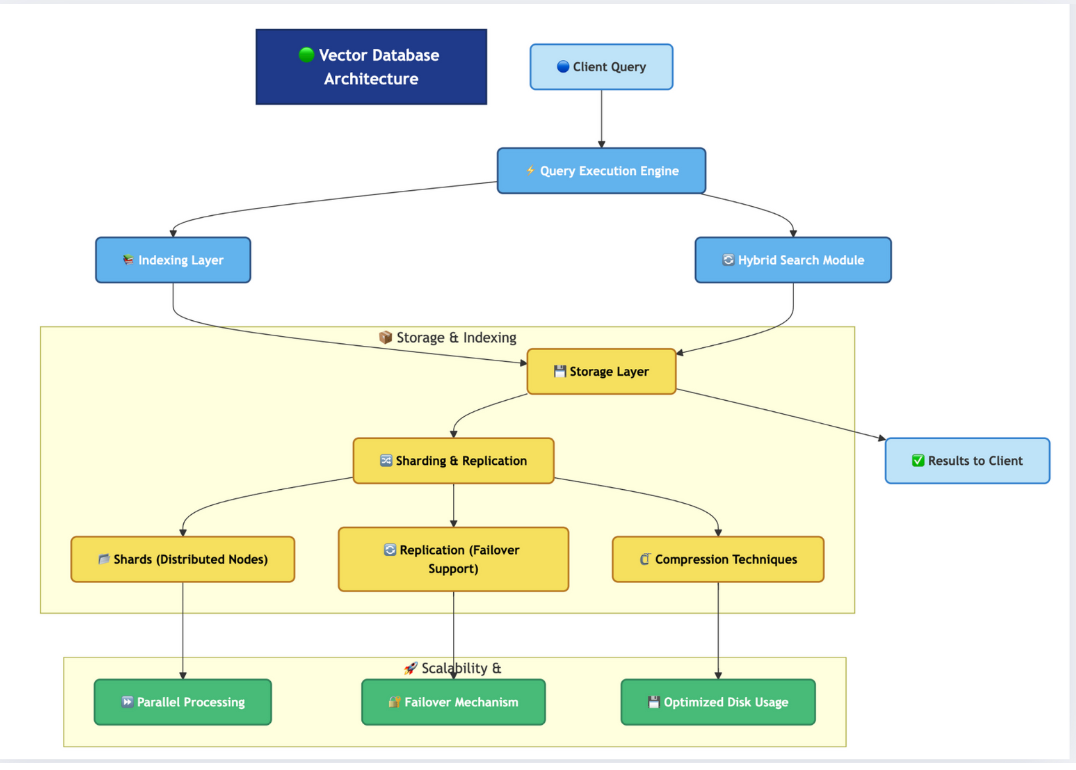
A vector database is built in layers, like an onion. Each layer has a clear role, and together they make search fast, scalable, and reliable.
Client Query → Execution Engine
When you type a query (like “budget phone with good camera”), it first goes to the query engine. This engine decides how to run the search.Indexing Layer
Vectors are stored in a way that makes them easy to find later. Think of it as building a special “map” of all stored vectors.Hybrid Search Module
Combines keyword search (traditional database style) with vector search (semantic search). This means results can match both exact words and meaning.Storage Layer
Keeps all the data safe and organized. Works hand in hand with indexing to allow quick lookups.Sharding & Replication
Large datasets are split across many servers (sharding). Each shard has backups (replication) for reliability.Compression Techniques
Vectors can be very large. Compression helps reduce space while keeping accuracy.Scalability Features
Parallel processing makes queries faster.
Failover mechanisms keep the system running if a server fails.
Optimized disk usage reduces storage costs.
👉 Together, these layers ensure that when you search, results come back quickly, even if billions of vectors are stored.
Indexing Techniques
Think of indexing as creating shortcuts in a big city so you don’t visit every house to find a friend.
Flat / Brute Force
Checks every vector. Exact and simple.
Great for small sets (≤50k).
Slow for millions of items.
HNSW
A graph of vectors with “highways” and “streets.”
You jump via hubs to reach close neighbors quickly.
Very fast and high recall; popular default for large text search.
IVF (Inverted File Index)
First cluster vectors into “buckets.”
During search, probe only the most relevant buckets.
Faster than flat; recall depends on how many buckets you probe.
PQ (Product Quantization)
Compress vectors to save memory.
Good when your data is huge and RAM is a constraint.
Small drop in accuracy for a big win in cost/latency.
IVF + PQ (cluster + compress)
Combine IVF and PQ for massive scale.
Common in production to balance speed, memory, and quality.
Rules of thumb
≤50k vectors → Flat is fine.
50k–5M → HNSW or IVF.
5M or tight RAM → IVF + PQ.
Retrieval Strategies (How You Actually Search)
Exact vs Approximate
Exact (Flat): perfect results, slower at scale.
Approximate (HNSW/IVF): very fast, almost as good.
Most apps use approximate methods.
Cosine vs Dot vs L2
Text embeddings: cosine is a safe default.
Normalize vectors → dot product ≈ cosine.
L2 is okay but less common for text.
Filtering
Use metadata filters before or after search.
Example:
(brand = "Samsung") AND (price <= 15000).
Hybrid retrieval
Combine keyword scores (BM25) with vector scores.
Why: some queries need exact terms and meaning.
Simple tactic: normalize both scores and add them with weights.
Reranking (optional)
Apply a second pass to reorder candidates: freshness, click-rate, a tiny reranker model.
Use when “good enough” isn’t good enough
.
Mini Case Study — “Study Buddy” Notes Search
Goal: Help a student find relevant notes fast and suggest what to read next.
Inputs
300 notes across topics (arrays, graphs, SQL).
Each note ~2–4 paragraphs.
Metadata: topic, week, difficulty.
Processing
Chunk each note to ~350 tokens, 50-token overlap.
Embed chunks with
all-MiniLM-L6-v2.Store vectors + metadata in a vector DB.
Build HNSW index (fast, high recall).
Build a tiny keyword index too (BM25) for hybrid scoring.
Query flow
User asks: “fast way to find an item in a sorted list.”
Embed query → vector search (k=10).
Filter by topic = “searching” (optional).
Hybrid: mix BM25 score (notes that say “binary search”) + vector score (notes about “find in sorted”).
Rerank by difficulty near user’s level.
Outputs
Top 3 notes (“Binary Search Basics”, “Common pitfalls”, “Lower/Upper Bound”).
“Next up” recommendation: “Search in rotated array” (difficulty +1).
Why this beats keywords
“fast way to find” ≈ “binary search” even if not named.
Hybrid ensures exact terms (if present) still help.
Comparison Table — SQL vs NoSQL vs Vector DB
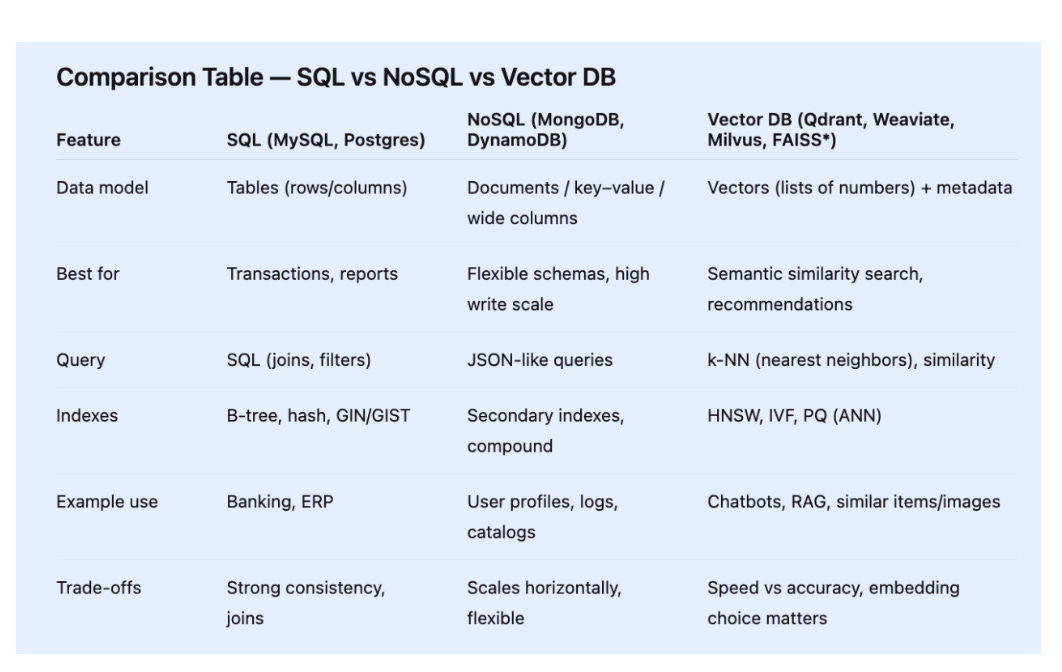
*FAISS is a local library, not a server DB, but it powers many vector systems under the hood.
Full Working Example — Text → Embeddings → Vector Search
This example uses sentence-transformers for embeddings and FAISS for search. It runs on CPU.
# pip install sentence-transformers faiss-cpu numpy

from sentence_transformers import SentenceTransformer
import numpy as np
import faiss

# 1) Data: short, clear sentences (chunks)
docs = [
    "Binary search finds an item in a sorted array in O(log n).",
    "Bubble sort repeatedly swaps adjacent elements to sort a list.",
    "Hash tables store key-value pairs for near O(1) lookup.",
    "Dijkstra's algorithm finds shortest paths in weighted graphs.",
    "The two-pointer technique scans from both ends efficiently.",
    "Depth-first search explores as far as possible along a branch.",
    "A stack uses LIFO order; a queue uses FIFO order.",
    "Merge sort divides, sorts, and merges in O(n log n).",
    "A heap supports efficient retrieval of the min or max element.",
    "Dynamic programming breaks problems into overlapping subproblems."
]

# 2) Embed with MiniLM (works well on CPU)
model = SentenceTransformer("sentence-transformers/all-MiniLM-L6-v2")
emb = model.encode(docs, convert_to_numpy=True, normalize_embeddings=True)
# normalize_embeddings=True lets us use dot product as cosine similarity

# 3) Build a FAISS index for inner product (cosine on normalized vectors)
dim = emb.shape[1]
index = faiss.IndexFlatIP(dim)   # IP = inner product
index.add(emb)                   # store all document vectors

# 4) Query → embed → search
def search(query, k=3):
    qv = model.encode([query], convert_to_numpy=True, normalize_embeddings=True)
    scores, idx = index.search(qv, k)
    print(f"\nQuery: {query}")
    for rank, (i, score) in enumerate(zip(idx[0], scores[0]), 1):
        print(f"{rank}. {docs[i]}  [score={score:.3f}]")

# 5) Try a few queries
search("fast way to find in a sorted list", k=3)   # expect Binary Search
search("shortest route between cities", k=3)       # expect Dijkstra
search("keep largest element on top", k=3)         # expect heap
What you’ll see
The first query should return the binary search sentence on top, even though you didn’t say “binary search.”
The second query should return the Dijkstra sentence.
The third should return the heap sentence.
Why this matters
You just built a tiny semantic search system: text → embeddings → vector index → nearest neighbors.
Retrieval Patterns You’ll Actually Use
Pure semantic
Only vector search.
Good for fuzzy, intent-heavy queries (“suggest similar papers”).
Semantic + filters
Vector search + metadata filter (brand, price, topic).
Good for catalogs, notes, knowledge bases.
Hybrid (keyword + vector)
Combine BM25 (keywords) and vectors.
Good when specific terms and meaning both matter.
Reranking
Take top 50 results, then apply a lightweight reranker.
Good for premium UX where top 5 must feel perfect.
Use Cases in the Real World (Concrete Pipelines)
Chatbot Memory & RAG (Retrieval-Augmented Generation)
Data: chunks of documents/FAQs.
Flow: chunk → embed → store → query embed → k-NN → pass retrieved chunks to LLM → answer.
Benefit: answers grounded in your data; fewer hallucinations.
E-commerce “Similar Items”
Data: product titles, descriptions, images.
Flow: embed text/images → store with price/brand tags → when user views a product, search nearest vectors → filter by availability/price → show “You may also like.”
Benefit: intent-aware recommendations beyond keywords.
Image Search by Example
Data: images; compute image embeddings (e.g., CLIP).
Flow: user uploads a photo → embed → k-NN → return visually similar images.
Benefit: find things you can’t describe with words.
Reader Q&A (Quick)
Do I need a GPU?
No. For MiniLM embeddings and FAISS, CPU is fine for small/medium projects.
Which vector DB should I start with?
Local experiments: FAISS. For a hosted DB with APIs: Qdrant, Weaviate, or Milvus.
Can I mix embeddings from different models?
Avoid mixing in the same index. Different models map meaning differently; results degrade.
Hope you enjoyed reading this article.
If you found it valuable, hit a like and consider subscribing for more such content every week.
If you have any questions or suggestions, leave a comment.
This post is public so feel free to share it.
Subscribe for free to receive new articles every week.
Thanks for reading Rocky’s Newsletter ! Subscribe for free to receive new posts and support my work.
I actively post coding, system design and software engineering related content on
Spread the word and earn rewards!
If you enjoy my newsletter, share it with your friends and earn a one-on-one meeting with me when they subscribe. Let's grow the community together.
I hope you have a lovely day!
See you soon,
Rocky
Thanks for the breadth and depth of recursion for the good 😊