

RAG 101: Retrieval-Augmented Generation Made Simple

👋 Welcome to this edition!
In every issue, we break down one concept shaping the future of technology—explained in plain English, with examples you can try on your own.
This time, we’re diving into Retrieval-Augmented Generation (RAG)—the approach that makes GenAI systems not only smarter, but also more trustworthy.
If LLMs are the brain, RAG is the memory. It retrieves the right information from your data—docs, FAQs, PDFs—and then lets the model generate an answer that is both relevant and grounded in facts.
From customer support bots that actually know your company policies to research assistants that cite sources, RAG is powering the next wave of useful AI.
Let’s explore what it is, why it matters, and how you can get started.
Why RAG Matters
You ask a chatbot, “What’s our latest refund policy?”
It answers correctly, quoting yesterday’s update from your company wiki.
This isn’t luck. Large Language Models (LLMs) are great at language, but they don’t know your private docs or yesterday’s edits. Retrieval-Augmented Generation (RAG) fills that gap: it fetches the right facts first, then generates the answer using those facts. The result is current, grounded, and explainable responses with links to sources.
RAG is the missing bridge between your data and your model. It reduces hallucinations, keeps answers fresh, and avoids expensive fine-tuning. If you want useful GenAI in the real world—support bots, knowledge search, coding help—RAG is the fastest, safest path.
What is RAG
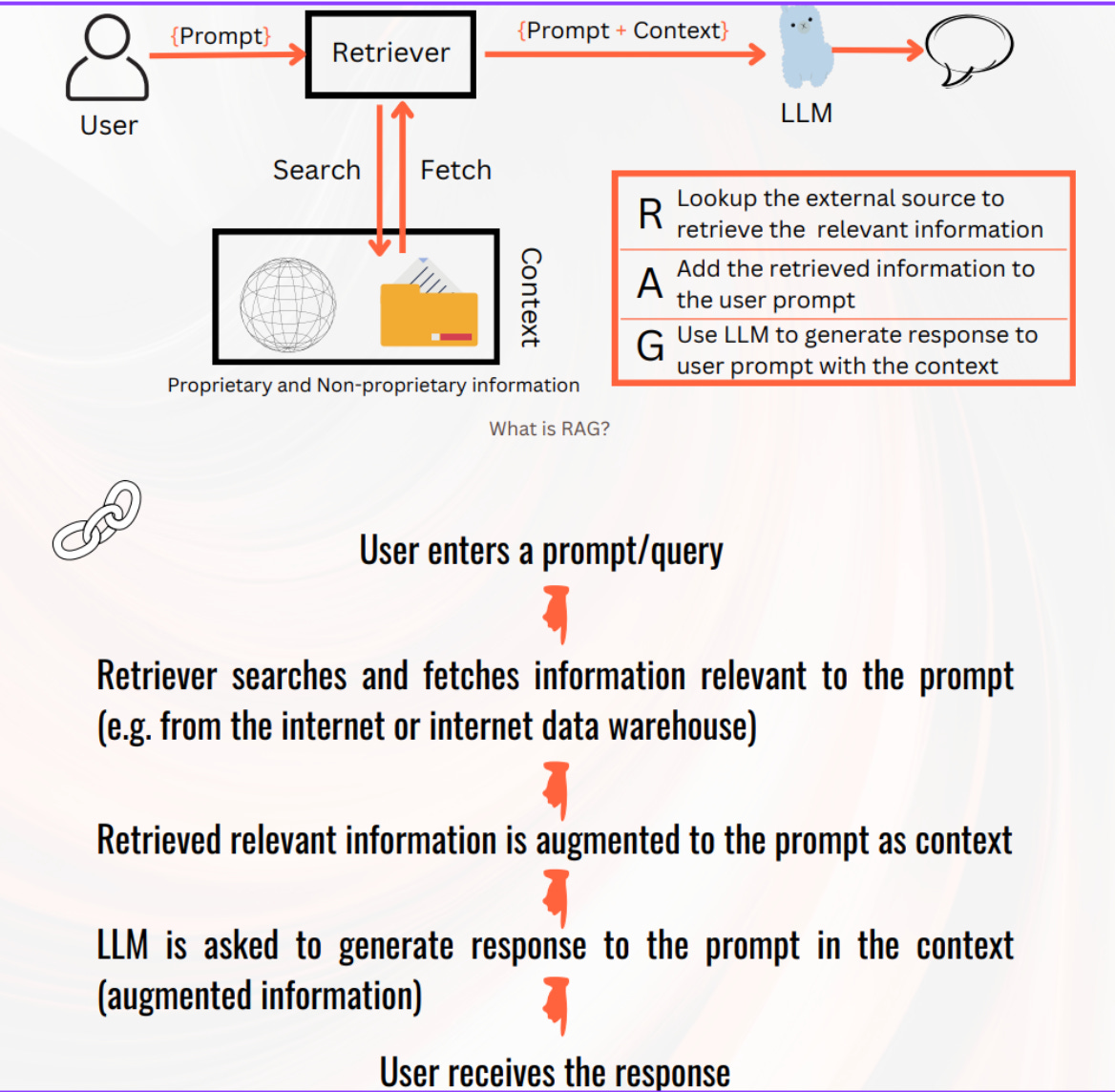
RAG (Retrieval-Augmented Generation) is a technique that combines search + generation.
First, it retrieves relevant information from your own data (docs, PDFs, FAQs, knowledge bases).Then, it augments the user’s question with that information and sends it to a Large Language Model (LLM).Finally, the model generates an answer that is grounded in your data, not just in its pretraining.
👉 In short: RAG makes AI smarter, more accurate, and up-to-date by giving it the right facts at the right time.
Core Concepts
1) RAG (Retrieval-Augmented Generation)
A two-step process: retrieve relevant context from your data, then ask the LLM to answer using that context.
Example: fetch 3 wiki pages about “refunds”, then generate a concise policy answer with citations.
2) Embedding
Turn text (or images/audio) into a vector—a list of numbers that captures meaning.
Example: “return period” and “refund window” embed to nearby vectors.
3) Vector
The numeric list (e.g., length 384/768/1024) representing content or a query.
Example: [0.12, -0.48, …] stands for a paragraph about exchange policy.
4) Retriever
The component that finds the most relevant chunks for a query (often via a vector database).
Example: top-k nearest neighbors for “refund timeline.”
5) Reranker
A lightweight model or rule that reorders retrieved chunks for better relevance.
Example: from 20 candidates, keep the 5 that mention “window: 30 days”.
6) Chunking
Split long docs into smaller pieces to keep meaning tight and retrieval precise.
Example: 300–500 token chunks with 10–20% overlap.
7) Prompt Template
The instruction scaffold that tells the LLM how to answer using the retrieved context.
Example: “Use only the context below. Cite sources. If missing, say ‘I don’t know.’”
8) Context Window
How much text the LLM can read at once. Larger windows fit more chunks but still need focus.
Example: pick the top 5–10 chunks, not 200.
9) Grounding & Citations
Attaching sources to the answer so readers can verify.
Example: “According to /policy/refunds.md (updated 2025-08-18)…”.
10) Hybrid Search
Combine keyword (BM25) and vector search for best coverage.
Example: filter “policy” by keyword, rank by semantic similarity to “refund”.
How RAG Works — Step by Step
📈 If you want to build real skills in Generative AI — not just theory —
my bootcamp is the perfect starting point.
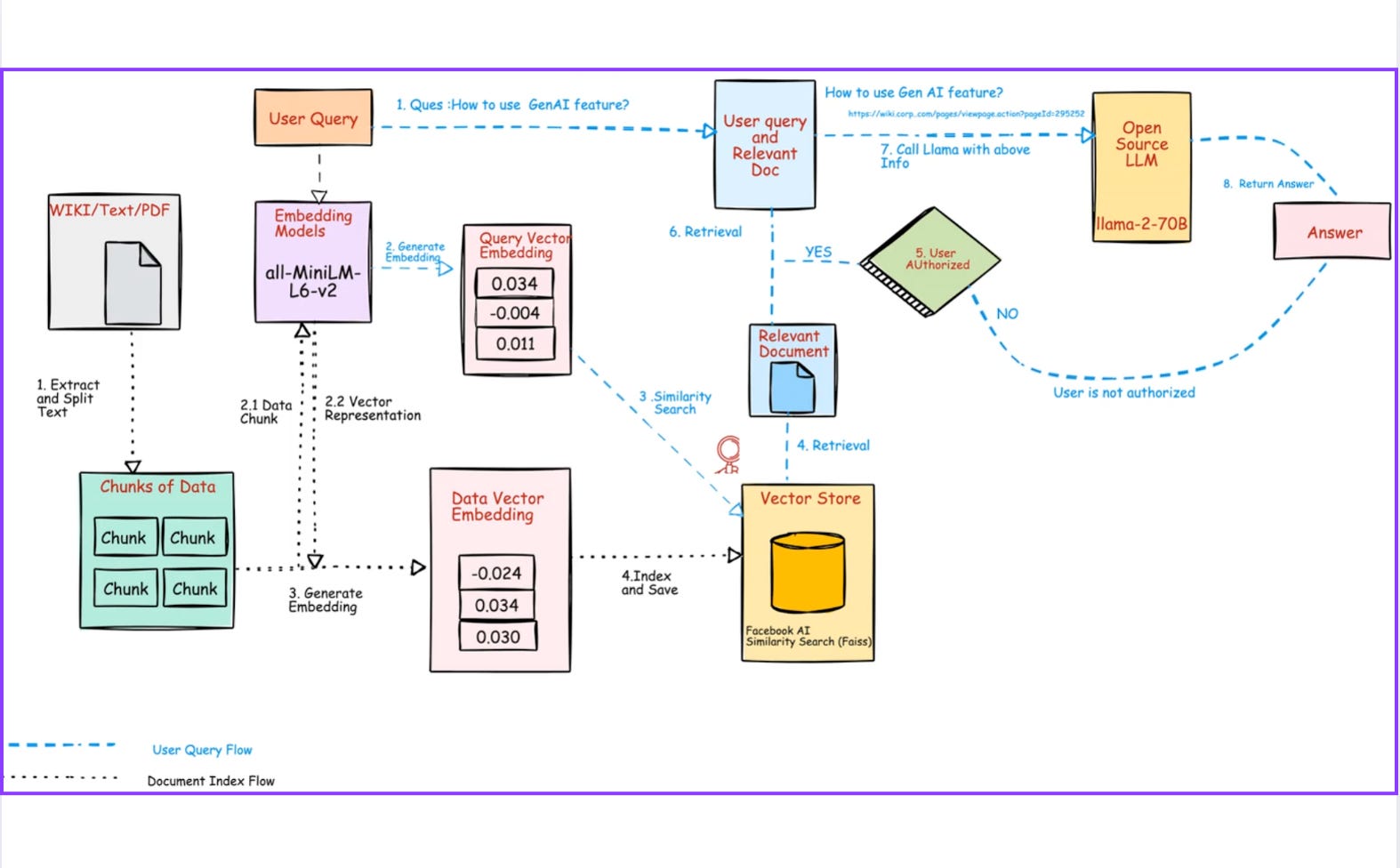
🔹 Step 1: Collect Data
You start with whatever knowledge base you want the AI to use. This could be:
Policy documents (PDFs, Word files)
FAQs or support tickets
Website/blog content
Code READMEs or API docs
👉 Think of this as building a library. Without books, a librarian (LLM) has nothing useful to answer with.
🔹 Step 2: Chunk
LLMs can’t process very long documents at once. So we split documents into smaller chunks, usually 300–500 tokens (2–3 paragraphs).
Small chunks capture focused meaning (e.g., one policy rule, one section of code).
Overlap (20–30 tokens) prevents cutting sentences in half or losing context.
👉 This is like dividing a long textbook into digestible flashcards. Each flashcard carries one clear idea.
🔹 Step 3: Embed
Each chunk is passed into an embedding model. This converts text into a vector — a list of numbers that represent meaning.
Example: “refund window” → [0.12, -0.44, 0.91, …]
Similar phrases (“return period”) get vectors close by.
👉 This is how the system “understands” meaning, not just keywords.
🔹 Step 4: Store
The vectors and their associated metadata (like title, filename, date updated, section) are stored in a vector database.
Metadata lets you filter results (e.g., only policies updated after 2024).
The DB builds indexes for fast search.
👉 Imagine a card catalog in a library, but instead of just author/title, it also understands “topics by meaning.”
🔹 Step 5: Query
A user types a question: “Can I get a refund after 35 days?”
This text is treated just like your documents — it will also be turned into a vector.
👉 So now the question and the documents live in the same meaning space.
🔹 Step 6: Embed Query
The question is embedded using the same model you used for documents.
Same dimensions (e.g., 768 numbers).
Same meaning-space.
👉 This ensures queries and chunks can be compared apples-to-apples.
🔹 Step 7: Retrieve
The query vector is compared to stored vectors using k-NN (k-nearest neighbors) search.
Finds the top k most similar chunks.
Uses distance metrics like cosine similarity.
Metadata filters can narrow results (e.g., only “refund” docs).
👉 This is like asking the librarian: “Which 5 flashcards are closest in meaning to my question?”
🔹 Step 8: Generate
The retrieved chunks are placed inside a prompt template and sent to an LLM.
The model is instructed: “Answer using only this context. If missing, say ‘I don’t know.’”
The LLM blends natural language skill with factual context.
👉 The LLM is no longer guessing — it’s grounded in your data.
🔹 Step 9: Return
The system outputs:
A natural-language answer.
Citations (which chunks/docs were used).
Logs for debugging (which chunks were retrieved, scores, etc.).
👉 This builds trust because the answer isn’t just text—it’s traceable to real sources.
🧾 Mini Case Study: Refunds Guide Bot
Goal
Build a chatbot that answers refund questions for customers — with clear citations to the company’s policy documents.
1. What Data We Use
Documents: refunds.md, exchanges.md, plus ~20 FAQ pages.
Metadata saved: document name (path), last updated date, product line.
2. How It Works
Prepare the text: Clean Markdown, split into smaller pieces (about 300–350 words). Add a little overlap so meaning isn’t lost.
Turn into numbers: Each chunk is converted into a vector (embedding) using a small, fast model.
Save in a database: Store vectors + metadata in a vector database. Use an HNSW index to make searching fast.
Search smartly: When a user asks a question, first check keywords like “refund” or “exchange” (BM25). Then combine that with vector search to capture meaning.
Keep it fresh: If two results are equally relevant, prefer the one updated most recently.
Ask with guardrails: Use a prompt template that says:
“Answer only from the context below. Cite document names. If missing, say ‘I don’t know.’”
3. Example Interaction
User question:
“Can I get a refund after 35 days?”
System steps:
Embeds the question into a vector.
Finds similar chunks in refunds.md and exchanges.md.
Builds a prompt with those chunks.
Sends to the LLM to generate a clear answer.
Bot’s answer:
“Our policy allows refunds within 30 days of delivery (see /policy/refunds.md, updated 2025-08-18). After 30 days, exchanges are possible for unopened items; refunds are not available.”
4. Why This Works
Always up-to-date: No retraining needed; just re-embed if policies change.
Trustworthy: Every answer includes a citation.
Efficient: You only embed once; retrieval is instant.
Sample Working Example (Python, end-to-end)
This shows the full loop text → embeddings → index → retrieve → compose prompt.
(You can plug the final prompt into any LLM—OpenAI, Ollama, or a local model.)
# pip install sentence-transformers faiss-cpu numpy
from sentence_transformers import SentenceTransformer
import numpy as np, faiss, textwrap

# 1) Tiny corpora (pretend these are chunks)
docs = [
  ("refunds.md", "Refunds are allowed within 30 days of delivery with receipt."),
  ("exchanges.md", "Exchanges are allowed within 45 days if the product is unopened."),
  ("shipping.md", "Standard shipping takes 5-7 days. Express shipping takes 2-3 days."),
  ("giftcards.md", "Gift cards are non-refundable but can be reissued if lost with proof.")
]

# 2) Embed with a small, fast model
model = SentenceTransformer("sentence-transformers/all-MiniLM-L6-v2")
texts = [d[1] for d in docs]
emb = model.encode(texts, convert_to_numpy=True, normalize_embeddings=True)

# 3) Build a cosine-sim index (inner product on normalized vectors)
dim = emb.shape[1]
index = faiss.IndexFlatIP(dim)
index.add(emb)

# 4) Simple retriever
def retrieve(query, k=3):
    qv = model.encode([query], convert_to_numpy=True, normalize_embeddings=True)
    scores, idx = index.search(qv, k)
    return [(docs[i][0], docs[i][1], float(scores[0][j])) for j, i in enumerate(idx[0])]

# 5) Compose a grounded prompt
def compose_prompt(query, passages):
    ctx = "\n\n".join([f"[{p[0]}] {p[1]}" for p in passages])
    template = f"""You are a helpful support assistant.
Use only the context to answer. If the answer is not in the context, say "I don't know."

Question: {query}

Context:
{ctx}

Answer with a short explanation and cite sources by filename in brackets.
"""
    return template

# 6) Try it
query = "Can I get a refund after 35 days?"
hits = retrieve(query, k=3)
prompt = compose_prompt(query, hits)

print("Top retrievals:")
for path, txt, sc in hits:
    print(f"- {path}  (score={sc:.3f})  → {txt}")

print("\nPrompt sent to LLM:\n")
print(textwrap.indent(prompt, "  "))
What to do next
Paste the printed prompt into your LLM of choice.
Observe it answers “No, refunds are within 30 days” and cites
refunds.md.Change the question to “What if the box is unopened after 40 days?” and watch it cite
exchanges.md.
Getting Started Roadmap
Pick data: 30–100 pages you understand (Markdown/PDF/HTML).
Chunk & embed:
sentence-transformers/all-MiniLM-L6-v2is a great start.Index: FAISS locally (Flat first); try HNSW when >50k chunks.
Query→retrieve: top-k (5–10), cosine similarity.
Prompt: “Use only the context; cite sources; if missing, say ‘I don’t know.’”
Evaluate: prepare 20–50 test questions; check accuracy and citations.
Hybrid: add BM25 + recency filter; rerank to polish.
Scale: move to Qdrant/Weaviate/Milvus; add update pipelines and caching.
Use Cases You Can Build This Month
Internal Answer Bot: plug in company policies, handbooks, and runbook docs; answer with citations.
Developer Copilot (Docs-Only): feed API docs/READMEs; retrieve relevant sections; generate example snippets.
Customer Support Drafts: retrieve policy language and generate polite, consistent replies for agents to edit.
Compliance Search: retrieve the relevant clauses and explain them with source links.
Reader Q&A
Do I need a GPU?
No. CPU is fine for MiniLM embeddings and FAISS. A GPU helps for huge corpora or heavy rerankers.
Should I fine-tune or use RAG?
Start with RAG. It’s cheaper and stays current. Fine-tune later if you need tone/style control.
Which vector DB should I pick?
Local experiments: FAISS. Managed: Qdrant, Weaviate, or Milvus—choose what fits your stack and budget.
Quick Glossary
RAG: retrieve relevant context, then generate the answer with it.
Embedding: a numeric representation of meaning.
Vector DB: database optimized for vector search.
k-NN: find the k nearest vectors to a query.
Context Window: how much text the LLM can read at once.
Grounding: tying answers to real sources with citations.
Hallucination: confident but false outputs; RAG reduces this.
Reranker: second-pass model to improve ordering of retrieved chunks.
Summary & Next Steps
RAG = fetch first, then generate. It keeps answers factual, current, and explainable.
You only need a few basics: chunking, embeddings, a vector index, and a clear prompt template.
Start small, evaluate with real questions, then add hybrid search and reranking.
This week’s mini-project
Ingest 50–100 of your own docs.
Build the tiny RAG loop above (retrieve → prompt → LLM).
Add citations and an “I don’t know” fallback.
Share one win and one failure you observed—then iterate on chunking and k.
You now have the foundation to make GenAI that actually knows your stuff.
Hope you enjoyed reading this article.
If you found it valuable, hit a like and consider subscribing for more such content every week.
If you have any questions or suggestions, leave a comment.
This post is public so feel free to share it.
Subscribe for free to receive new articles every week.
Thanks for reading Rocky’s Newsletter ! Subscribe for free to receive new posts and support my work.
I actively post coding, system design and software engineering related content on
Spread the word and earn rewards!
If you enjoy my newsletter, share it with your friends and earn a one-on-one meeting with me when they subscribe. Let's grow the community together.
I hope you have a lovely day!
See you soon,
Rocky
Long lessons summary and services to the same for the good 😊
Good summary