

How Would You Design TinyURL? Most Candidates Struggle Here

🚀 Intro:
TinyURL isn’t just about shortening links. It’s a deceptively simple service that needs to handle:
Millions of URL redirections daily,
Heavy bursts of traffic driven by viral links,
And near-instant lookups to avoid slowing down the user’s experience.
Yet it manages to stay blazing fast, cost-efficient, and highly reliable.
Studying TinyURL’s architecture teaches you practical lessons on:
✅ Designing low-latency systems that rely on smart caching to serve requests in microseconds.
✅ Building fault-tolerant services with simple but powerful database models.
✅ Handling idempotent operations and preventing duplicate short codes under concurrency.
✅ Keeping operations minimal (read → redirect) for massive scale.
It’s a textbook example of how to architect small, focused, yet rock-solid distributed systems.
TinyURL is a URL shortening service that transforms lengthy URLs into compact, shareable links, enabling seamless redirection and tracking. This comprehensive system design delves into the architecture, components, and trade-offs required to build a scalable, low-latency, and highly available service like TinyURL.
We’ll explore functional and non-functional requirements, estimate system capacity, design a robust architecture, and provide in-depth insights into data models, algorithms, scalability strategies, security measures, and fault tolerance. This blueprint draws inspiration from real-world URL shortening services and system design principles, aiming to create a production-ready solution.
📌 1. Requirements & Estimations
✅ Functional Requirements
The TinyURL system must support the following core features:
URL Shortening: Convert a long URL (e.g.,
https://example.com/very/long/path/to/resource) into a short alias (e.g.,tinyurl.com/abc123).Redirection: Resolve a short URL to its original long URL with an HTTP 301 redirect.
Custom Alias Support: Allow users to specify custom short keys (e.g.,
tinyurl.com/mybrand), subject to availability.Analytics Tracking: Record metrics like click counts, geographic data, and access timestamps for each short URL.
Expiration and Deletion: Support optional expiration dates for URLs and allow users to delete their URLs.
API Access: Provide RESTful APIs for programmatic URL creation and analytics retrieval.
🚀 Non-Functional Requirements
To meet enterprise-grade standards, the system must address:
Scalability: Handle 100 million URL creations and 1 billion redirections daily, with the ability to scale horizontally.
Low Latency: Achieve p90 latency of <200ms for redirections and <500ms for URL creation.
High Availability: Ensure 99.99% uptime (less than 52.56 minutes of downtime per year).
Reliability: Guarantee no loss of URL mappings and 100% redirection accuracy.
Security: Mitigate abuse (e.g., phishing, spam) and ensure data integrity with HTTPS and input validation.
Global Accessibility: Minimize latency for users worldwide using a Content Delivery Network (CDN).
Cost Efficiency: Optimize resource usage to balance performance and infrastructure costs.
📊 Estimations & Capacity Planning
Let’s break this down using realistic assumptions to size our system.
Traffic:
URL creation: 100 million/day ≈ 1,157 writes/second (100M / 86,400 seconds).
Redirection: 1 billion/day ≈ 11,574 reads/second (1B / 86,400 seconds).
Read-to-write ratio: ~10:1, indicating a read-heavy workload.
Storage:
Each URL mapping includes:
Short key: 6-8 characters (6-8 bytes, base62 encoded).
Long URL: Average 100 characters (100 bytes, UTF-8 encoded).
Metadata: User ID (16 bytes, UUID), creation/expiration timestamps (16 bytes), click count (8 bytes), ≈40 bytes total.
Total per record: ~150 bytes.
Daily storage: 100M URLs * 150 bytes ≈ 15 GB/day.
5-year storage: 15 GB * 365 * 5 ≈ 27.4 TB (without compression or pruning).
Bandwidth:
Redirection: 1B redirects * 100 bytes (long URL in response) ≈ 100 GB/day.
URL creation: 100M * 150 bytes (request/response) ≈ 15 GB/day.
Cache Size: Assume 10% of URLs are frequently accessed (10M URLs * 150 bytes ≈ 1.5 GB in cache).
Analytics: Click tracking generates 1B events/day * 50 bytes/event (timestamp, geo, device) ≈ 50 GB/day.
🚀 API Design
The TinyURL service exposes a RESTful API to support URL creation, redirection, management, and analytics. Below are the key endpoints, request/response formats, status codes, and considerations.
Base URL
https://api.tinyurl.com/v1
Authentication
JWT: Required for user-specific endpoints (e.g., custom aliases, URL deletion). Include in Authorization: Bearer <token> header.
Anonymous Access: Allowed for URL creation (without custom alias) and redirection.
Rate Limiting: 100 requests/minute per IP (anonymous) or user (authenticated), enforced via Redis token bucket.
Endpoints
1. Create Short URL
Endpoint: POST /create
Description: Creates a short URL for a given long URL.
Request:
{
  "long_url": "https://example.com/very/long/path",
  "custom_alias": "mybrand" // Optional
  "expires_at": "2025-12-31T23:59:59Z" // Optional, ISO 8601
}Response:
201 Created:
{
  "short_url": "https://tinyurl.com/abc123",
  "long_url": "https://example.com/very/long/path",
  "created_at": "2025-07-11T01:23:59Z",
  "expires_at": "2025-12-31T23:59:59Z"
}
400 Bad Request: Invalid URL or custom alias (e.g., too long, invalid characters).
{
  "error": "Invalid long_url format"
}
409 Conflict: Custom alias already taken.
{
  "error": "Custom alias 'mybrand' is already in use"
}
429 Too Many Requests: Rate limit exceeded.
{
  "error": "Rate limit exceeded. Try again in 60 seconds"
}Security: Validate long_url with regex (^https?://[\w.-]+) and Google Safe Browsing API.
2. Redirect Short URL
Endpoint: GET /:short_key (e.g., /abc123)
Description: Redirects to the long URL and logs click event.
Request: No body; short_key in URL path.
Response:
301 Moved Permanently: Redirects to long URL.
Header: Location: https://example.com/very/long/path
404 Not Found: Short key does not exist or expired.
{
  "error": "Short URL not found or expired"
}Security: Rate limit to 1000 requests/minute per IP to prevent DDoS.
3. Preview Short URL
Endpoint: GET /preview/:short_key
Description: Returns long URL without redirecting (useful for safety checks).
Request: No body.
Response:
200 OK:
{
  "short_url": "https://tinyurl.com/abc123",
  "long_url": "https://example.com/very/long/path",
  "created_at": "2025-07-11T01:23:59Z",
  "expires_at": "2025-12-31T23:59:59Z",
  "click_count": 42
}
404 Not Found: Short key does not exist or expired.
Security: Publicly accessible; rate limited.
4. Delete Short URL
Endpoint: DELETE /:short_key
Description: Deactivates a short URL (authenticated users only).
Request: No body; requires JWT.
Response:
204 No Content: Successfully deleted.
403 Forbidden: User does not own the URL.
{
  "error": "Unauthorized: You do not own this URL"
}
404 Not Found: Short key does not exist.
Security: JWT validation; only URL owner or admin can delete.
5. List User URLs
Endpoint: GET /user/urls
Description: Lists all URLs created by the authenticated user.
Request:
Query params: ?page=1&limit=50 (pagination).
Response:
200 OK:
{
  "urls": [
    {
      "short_url": "https://tinyurl.com/abc123",
      "long_url": "https://example.com/very/long/path",
      "created_at": "2025-07-11T01:23:59Z",
      "click_count": 42
    }
  ],
  "pagination": {
    "page": 1,
    "limit": 50,
    "total": 1
  }
}
401 Unauthorized: Missing or invalid JWT.
Security: JWT required; paginated to prevent overload.
6. Get Analytics
Endpoint: GET /analytics/:short_key
Description: Retrieves click analytics for a short URL (authenticated users only).
Request:
Query params: ?start_date=2025-07-01&end_date=2025-07-11
Response:
200 OK:
{
  "short_url": "https://tinyurl.com/abc123",
  "click_count": 42,
  "by_country": {
    "US": 20,
    "IN": 15,
    "UK": 7
  },
  "by_device": {
    "mobile": 25,
    "desktop": 17
  },
  "clicks_over_time": [
    { "date": "2025-07-01", "count": 5 },
    { "date": "2025-07-02", "count": 10 }
  ]
}
403 Forbidden: User does not own the URL.
404 Not Found: Short key does not exist.
Security: JWT required; data from InfluxDB for efficiency.
API Considerations
Versioning: Use /v1 to support future changes (e.g., /v2 for breaking changes).
Error Handling: Standardized JSON error responses with error field.
Rate Limiting: Redis-based token bucket; different limits for anonymous vs. authenticated users.
Caching: Cache GET /preview and GET /analytics responses in Redis (TTL: 5 minutes).
Scalability: Use API gateway (e.g., AWS API Gateway) for request routing and throttling.
Monitoring: Track API latency and error rates via Prometheus (e.g., p90 latency, 4xx/5xx rates).
Security: Enforce HTTPS, validate inputs, and scan URLs with Google Safe Browsing.
🚀 Database Design
Schema
We use PostgreSQL for structured, reliable storage:
Table: url_mappings
short_key(VARCHAR(10), Primary Key): Unique short URL key (e.g.,abc123).long_url(TEXT): Original URL (max 2048 characters).user_id(UUID, Foreign Key, Nullable): ID of the creator (null for anonymous users).created_at(TIMESTAMP): Creation timestamp.expires_at(TIMESTAMP, Nullable): Expiration timestamp (null if no expiration).click_count(BIGINT): Number of clicks, default 0.is_active(BOOLEAN): Whether the URL is active, default true.
Table: users
user_id(UUID, Primary Key): Unique user identifier.email(VARCHAR(255)): User email for authentication.password_hash(VARCHAR(255)): Hashed password for security.created_at(TIMESTAMP): Account creation timestamp.
Table: click_events (for raw analytics data)
event_id(UUID, Primary Key): Unique event ID.short_key(VARCHAR(10), Foreign Key): Associated short URL key.timestamp(TIMESTAMP): Click timestamp.country(VARCHAR(2)): Two-letter country code (ISO 3166-1).device_type(VARCHAR(50)): Device type (e.g., mobile, desktop).
Sharding Strategy
Consistent Hashing: Shard
url_mappingsbyshort_keyto distribute data evenly across servers.Shard Key: Use the first 2-3 characters of
short_keyfor sharding to ensure balanced distribution.Replication: Each shard has 1 primary and 2 secondary nodes for high availability.
Indexing
Primary index on
short_keyfor O(1) redirection lookups.Index on
user_idandcreated_atfor user-specific queries (e.g., list URLs by user).Composite index on
expires_atandis_activefor efficient cleanup of expired/inactive URLs.Index on
click_countfor sorting URLs by popularity in analytics.
High-Level Architecture
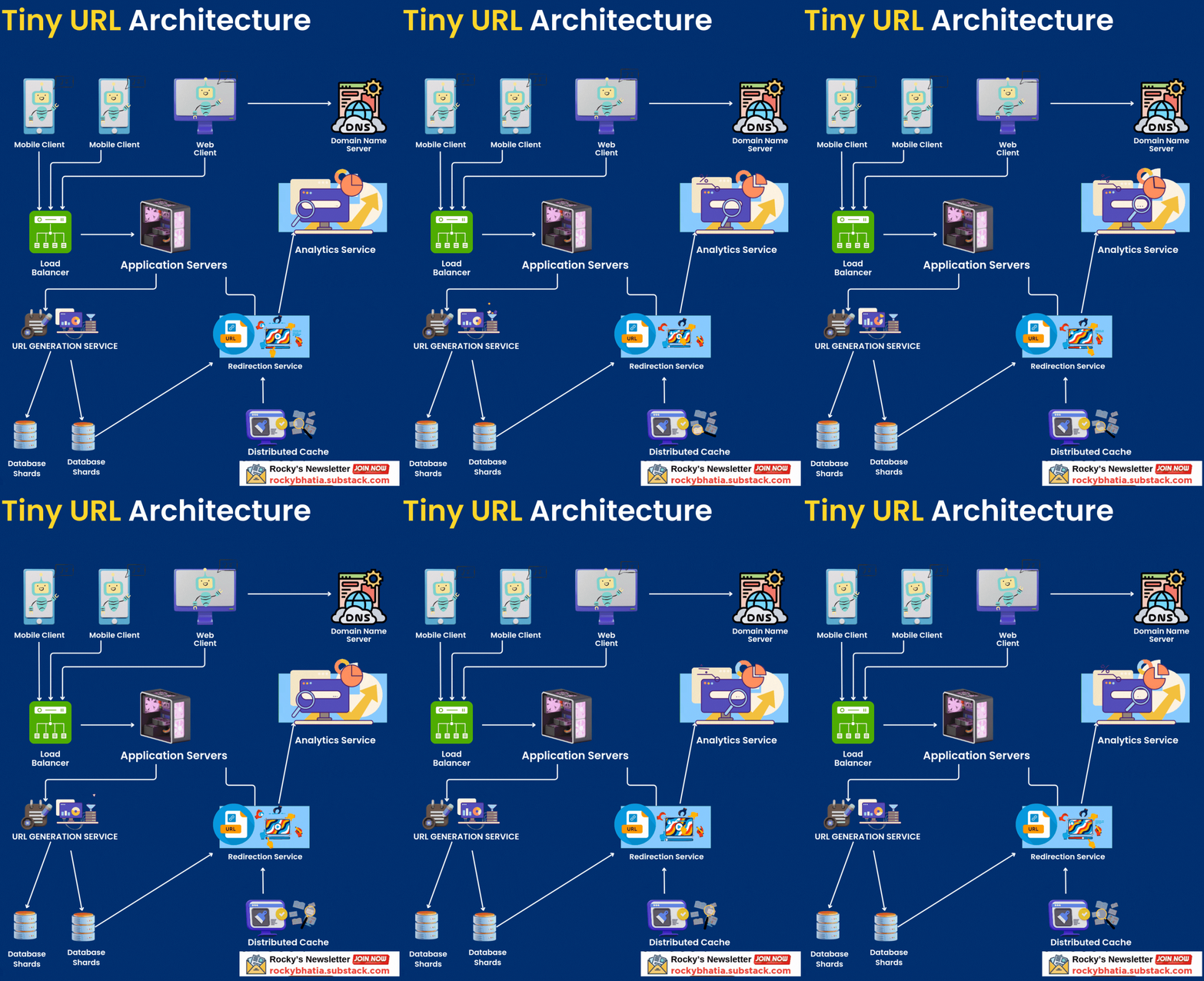
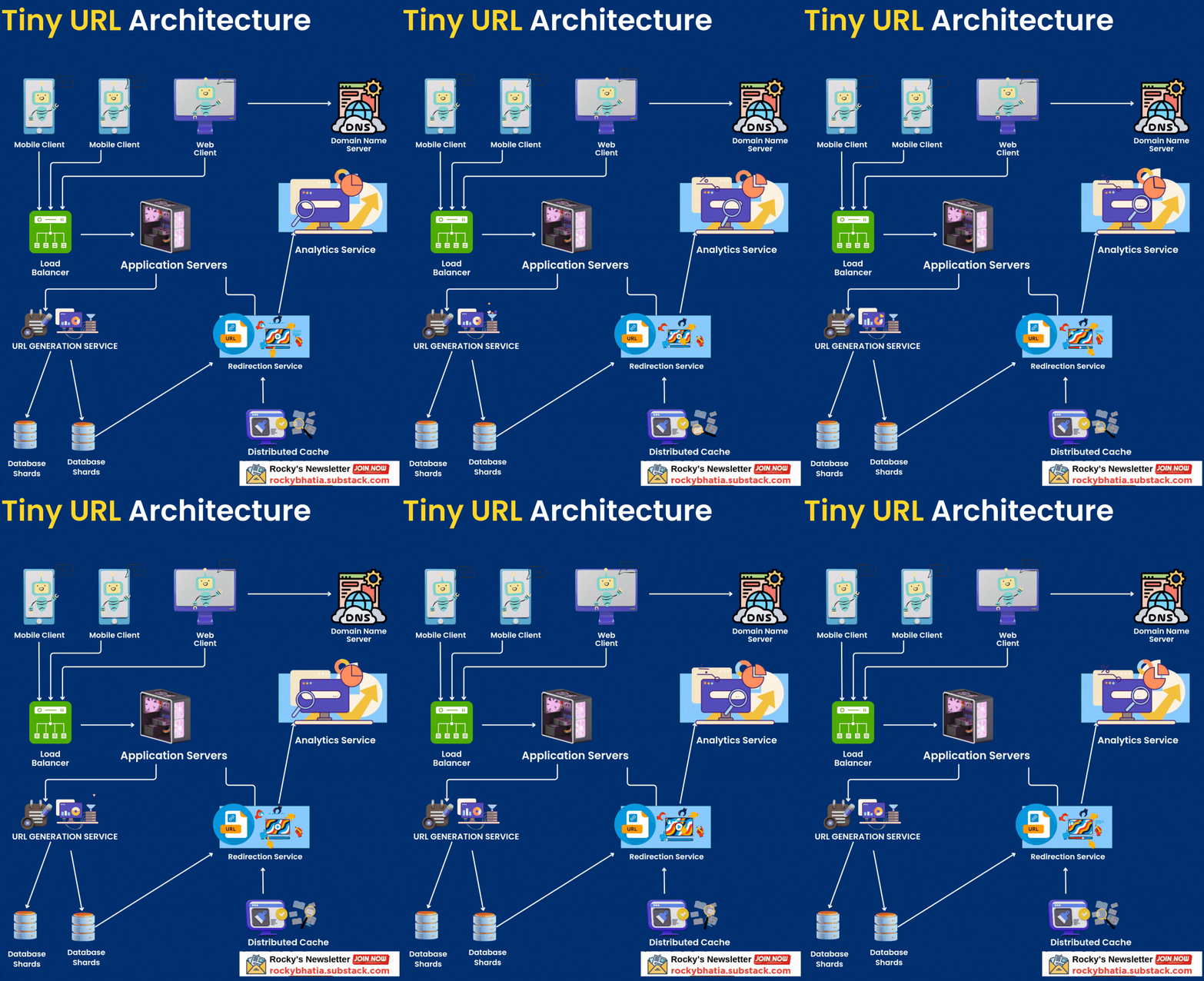
The TinyURL system resembles a global logistics network: requests flow through gateways (load balancers) to processing units (application servers), with data stored in warehouses (databases) and fast-access caches (distribution centers). Below is the architecture:
Client Layer: Users interact via web browsers, mobile apps, or REST APIs.
DNS: Resolves
tinyurl.comto a global load balancer (e.g., AWS Route 53).Load Balancer: Distributes traffic across application servers using Layer 4 (TCP) for redirections and Layer 7 (HTT
P) for URL creation.
Application Servers: Handle business logic for URL creation, redirection, custom aliases, and analytics.
Cache Layer: Redis Cluster for low-latency access to URL mappings.
Database Layer: Sharded PostgreSQL for persistent storage of URL mappings and user data.
Message Queue: Kafka for asynchronous click tracking and analytics processing.
Analytics Service: Processes click data and stores aggregated metrics in a time-series database (e.g., InfluxDB).
CDN: Akamai or Cloudflare to cache redirection responses globally.
Monitoring & Logging: Prometheus, Grafana, and ELK Stack for system health and performance tracking.
Data Flow
URL Creation:
Client sends a POST request to
/createwith the long URL and optional custom alias.DNS resolves to the load balancer, which routes to an application server.
Server validates the long URL (e.g., checks for malicious patterns, length < 2048 chars).
For non ascend: Server generates a unique short key (or validates custom alias).
Server stores mapping in the database and updates Andres: updates cache.
Server returns short URL to the client.
Cache is updated with the new mapping.
URL Redirection:
Client requests a short URL (e.g.,
tinyurl.com/abc123).DNS routes to the load balancer.
Load balancer forwards to an application server.
Server checks cache for the short key (cache hit: ~90% expected).
If cache miss, server queries the database.
Server updates click count in Kafka (async).
Server responds with HTTP 301 redirect to the long URL.
CDN caches frequent redirects for low latency.
Key Components in Depth
Short URL Generation
Algorithm: Use a counter-based approach with base62 encoding (A-Z, a-z, 0-9).
Counter starts at 0, increments for each new URL.
Convert counter to base62: 6 characters yield 62⁶ ≈ 56.8B combinations.
Example: Counter 12345 →
abc123(base62).
Collision Handling:
Check database for existing
short_key.If collision, increment counter and retry (rare due to large key space).
For custom aliases, validate uniqueness and reject if taken.
Key Length: 6-8 characters balance brevity and capacity.
6 chars: 56.8B URLs.
8 chars: 218 trillion URLs.
Randomization Option: For anonymous URLs, optionally use a hash (e.g., MD5) of the long URL to generate a pseudo-random key, reducing collision checks.
Caching
Technology: Redis Cluster for distributed, in-memory key-value storage.
Cache Structure: Key-value pairs (
short_key→long_url).Eviction Policy: LRU to prioritize frequently accessed URLs.
Cache Size: 1.5 GB for 10M URLs (10% of daily traffic).
Consistency: Write-through caching for URL creation to ensure immediate consistency.
Cache Warmup: Preload top 1% of URLs (by click count) after restarts.
TTL: Set cache TTL to 30 days for non-expiring URLs, matching typical expiration policies.
Load Balancing
Technology: NGINX or HAProxy for high-performance load balancing.
Redirection: Layer 4 (TCP) for speed, as redirects are stateless.
URL Creation: Layer 7 (HTTP) to inspect headers for custom aliases and authentication.
Algorithm: Least connections to balance load across servers.
Health Checks: Periodic pings to detect and remove unhealthy servers.
Sticky Sessions: Optional for user-specific features (e.g., custom alias editing).
Analytics Service
Message Queue: Kafka for decoupling click tracking from redirection.
Producers: Application servers publish click events.
Consumers: Analytics service processes events asynchronously.
Event Data: Includes
short_key,timestamp,country,device_type,referrer, anduser_agent.Storage: Raw events in PostgreSQL, aggregated metrics in InfluxDB.
Aggregation: Compute metrics like clicks per URL, top countries, and peak hours.
Query Performance: Use InfluxDB for fast time-series queries (e.g., clicks over 24 hours).
Retention: Keep raw events for 90 days, aggregated data for 5 years.
Security
Input Validation:
Validate long URLs against a blocklist of malicious domains.
Limit URL length to 2048 characters to prevent buffer overflows.
Sanitize inputs to prevent XSS or SQL injection.
Rate Limiting:
Limit URL creation to 100 requests/minute per IP/user.
Use token bucket algorithm in Redis for distributed rate limiting.
Authentication:
OAuth 2.0 for third-party logins (e.g., Google, GitHub).
JWT for stateless, secure API authentication.
Role-based access: Admins can manage all URLs, users manage their own.
HTTPS: Enforce TLS 1.3 with Let’s Encrypt certificates.
Abuse Prevention:
Scan long URLs with Google Safe Browsing API.
Flag URLs with excessive redirects (>10K clicks/day) for manual review.
CAPTCHA for anonymous URL creation to deter bots.
CDN Integration
Provider: Cloudflare or Akamai for global edge caching.
Cache Content: HTTP 301 redirect responses for short URLs.
Cache Headers: Set
Cache-Control: max-age=3600for 1-hour caching.Purge Strategy: Invalidate cache on URL updates or deletion.
Edge Locations: Deploy in 200+ global PoPs for <50ms latency.
Scalability Considerations
Horizontal Scaling:
Application servers: Add nodes with Docker and Kubernetes.
Database: Add shards with automated rebalancing.
Cache: Scale Redis Cluster with additional nodes.
Database Optimization:
Partition
url_mappingsbyshort_keyprefix (e.g.,ab*to shard 1).Use read replicas (2 per shard) for read-heavy workloads.
Optimize writes with batch inserts for analytics events.
Cache Scaling: Redis Cluster with 3-5 nodes, auto-scaling based on memory usage.
Load Testing: Simulate 15K reads/second and 1.5K writes/second using Locust.
Global Reach: Use CDN and multi-region database replicas in AWS (us-east-1, eu-west-1, ap-south-1).
Auto-Scaling: AWS Auto Scaling Groups for servers, triggered by CPU > 80%.
Trade-offs
Consistency vs. Availability:
Redirection: Prioritize availability (AP system per CAP theorem).
Analytics: Eventual consistency via Kafka (small delays in click counts).
Cost vs. Performance:
Use NVMe SSDs for database servers (high IOPS, ~$0.1/GB/month).
Cache aggressively to reduce database costs (~$0.03/GB/month for Redis).
Complexity vs. Simplicity:
Relational DB (PostgreSQL) over NoSQL for structured data and ACID compliance.
Add NoSQL (e.g., DynamoDB) only for unstructured analytics if needed.
Latency vs. Accuracy:
Cache redirects for <50ms latency, risking stale redirects (rare).
Periodic cache sync with database (every 5 minutes).
Fault Tolerance
Database Failover:
Use PostgreSQL streaming replication with 2-second failover.
Patroni for automatic leader election in multi-node clusters.
Cache Recovery:
Warm cache with top 1% URLs by click count post-restart.
Use Redis Sentinel for high-availability cache failover.
Server Redundancy:
Deploy servers in 3 AWS availability zones per region.
Use EKS for container orchestration and auto-recovery.
Data Backup:
Daily incremental backups of PostgreSQL to S3.
Point-in-time recovery for up to 7 days of data.
Monitoring:
Prometheus for metrics (latency, error rates, CPU usage).
Grafana for dashboards (e.g., p90 latency, cache hit ratio).
ELK Stack for centralized logging and error analysis.
Chaos Engineering:
Simulate server failures with Chaos Monkey.
Test CDN failover with Gremlin.
Advanced Features
Batch Processing: Process expired URLs nightly with a cron job.
Geo-Targeting: Redirect to region-specific long URLs if provided (e.g.,
example.com/usvs.example.com/uk).URL Preview: API endpoint (
/preview/:short_key) to show long URL without redirecting.Rate Limit Alerts: Notify users via email when nearing limits (e.g., 90% of 100/min).
A/B Testing: Test redirection latency with different cache TTLs (1h vs. 24h).
Multi-Tenancy: Isolate user data with schema-based separation in PostgreSQL.
Performance Metrics
Redirection Latency: p90 < 100ms with CDN and cache.
URL Creation Latency: p90 < 500ms with write-through caching.
Cache Hit Ratio: >90% for redirects.
Database QPS: Handle 15K queries/second (90% reads, 10% writes).
Uptime: 99.99% (4 nines) with multi-AZ deployment.
Error Rate: <0.01% for redirects (measured via ELK logs).
Security Enhancements
WAF: AWS WAF to block SQL injection and XSS attempts.
DDoS Protection: Cloudflare for rate limiting and IP blacklisting.
Audit Logs: Store all URL creation/deletion actions in PostgreSQL for 90 days.
Encryption: AES-256 for data at rest, TLS 1.3 for data in transit.
Penetration Testing: Annual tests with tools like Burp Suite.
Conclusion
Building a TinyURL-like service demands a careful balance of scalability, low latency, and reliability. By leveraging sharded PostgreSQL, Redis caching, Kafka for analytics, and a global CDN, the system can handle 1 billion daily redirects and 100 million URL creations with sub-second performance. Security measures like input validation, rate limiting, and HTTPS ensure safety, while fault tolerance strategies like replication and multi-AZ deployment provide 99.99% uptime. This blueprint offers a scalable, production-ready design adaptable to evolving demands.
Hope you enjoyed reading this article.
If you found it valuable, hit a like and consider subscribing for more such content every week.
If you have any questions or suggestions, leave a comment.
This post is public so feel free to share it.
Subscribe for free to receive new articles every week.
Thanks for reading Rocky’s Newsletter ! Subscribe for free to receive new posts and support my work.
I actively post coding, system design and software engineering related content on
Spread the word and earn rewards!
If you enjoy my newsletter, share it with your friends and earn a one-on-one meeting with me when they subscribe. Let's grow the community together.
I hope you have a lovely day!
See you soon,
Rocky
Have used tinyurls with mail features but getting to know about the working in internet now only for the good 😊
Great walkthrough for the good 😊